This is part one of the RSA Public Key Manipulation series.
See also Part 2: Encrypting and Chunking Data in RSA Keys
Introduction
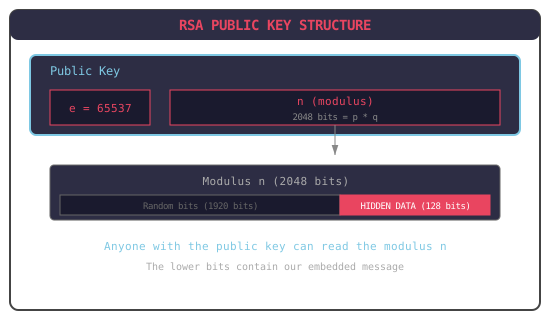
This post explains a technique for hiding arbitrary data inside RSA public keys. The hidden data can be extracted by anyone who knows where to look.
This technique is used in:
- Certificate Transparency as Communication Channel — hiding messages in TLS certificates
- SBOM as Messaging System — building a covert messaging system on Sigstore/Rekor
An RSA public key has:
- e — the public exponent (usually just 65537)
- n — the modulus (a very large number, typically 2048 or 4096 bits)
The modulus n is the product of two secret prime numbers: n = p × q
We control which primes we use. If we choose primes that their product n contains specific bit patterns, we can embed data directly in the modulus.
Since the modulus is part of the public key, anyone can read it but this is useful for some cases as described in the previous posts.
RSA Encryption
The flow is:
Key Generation:
- Pick two large primes
pandq - Compute modulus
n = p × q - Compute
φ(n) = (p-1) × (q-1) - Choose public exponent
e - Compute private exponent
dsuch thate × d ≡ 1 (mod φ(n))
- Pick two large primes
Public Key:
(e, n)Private Key:
(d, n)(or equivalently, knowingpandq)Encryption:
ciphertext = message^e mod nDecryption:
message = ciphertext^d mod n
The Embedding Technique
We want to create an RSA key where the lower bits of the modulus n contain our hidden message:
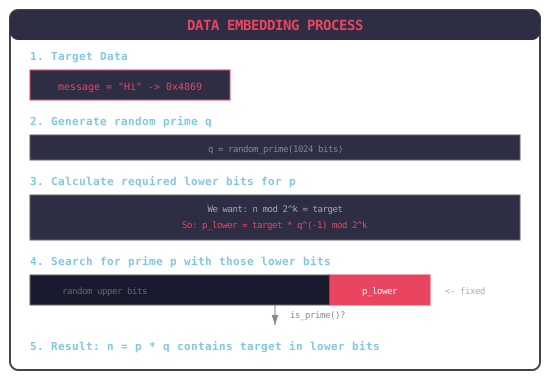
If we want n mod 2^k = target (where target is our hidden data), and we’ve already picked a prime q, we need to find a prime p such that:
n = p × q
n mod 2^k = target
(p × q) mod 2^k = target
p mod 2^k = target × q^(-1) mod 2^k
So we then:
- Pick any prime
q - Compute
q^(-1) mod 2^k(the modular inverse ofq) - Calculate what the lower k bits of
pmust be:p_lower = target × q^(-1) mod 2^k - Search for a prime
pthat has those exact lower bits
Because there are lots of large prime numbers, it’s actually quite fast to search for a prime with the specific property we need.
The lower bits of a large number multiplication are determined by the lower bits of the numbers being multiplied. When calculating p × q, the lowest k bits of the result depend only on the lowest k bits of p and q.
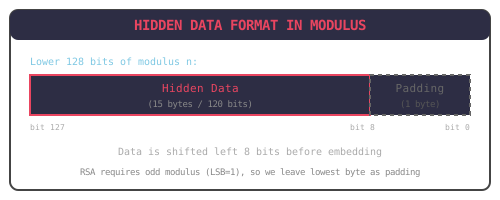
RSA moduli must be odd (since they’re products of two odd primes). This means the least significant bit (LSB) of n is always 1.
If the data happens to have LSB = 0, it would be corrupted, so we shift the data left by 8 bits before embedding, leaving the lowest byte for RSA’s requirements.
Walkthrough
Let’s hide the message “Hi” (2 bytes) in an RSA-2048 key.
Step 1: Prepare the Data for embedding
message = b"Hi"
# Hex: 0x4869

# Shift left 8 bits to avoid LSB corruption
data_int = int.from_bytes(message, 'big') << 8
# Result: 0x486900

# Set LSB to 1 (RSA requirement)
target = data_int | 1
# Result: 0x486901
Step 2: Generate First Prime (q)
Generate a random 1024-bit prime q using standard methods:
q = generate_prime(1024)
# Example: q = 0xd4f3a2b1...  (1024 bits)
Step 3: Calculate Required Lower Bits for p
k = 24  # We're hiding 24 bits (3 bytes with shift)
mask = (1 << k) - 1  # 0xFFFFFF

# Modular inverse of q mod 2^k
q_inv = pow(q, -1, 1 << k)

# Required lower bits for p
p_lower = (target * q_inv) & mask
Step 4: Search for Prime p
for attempt in range(100000):
    # Generate random upper bits
    upper = random_bits(1024 - k)

    # Combine with required lower bits
    p_candidate = (upper << k) | p_lower

    # Check if it's prime
    if is_prime(p_candidate):
        p = p_candidate
        break
Step 5: Verify
n = p * q

# Extract lower 24 bits
extracted = n & 0xFFFFFF
print(hex(extracted))  # 0x486901

# Remove padding
data = (extracted >> 8).to_bytes(2, 'big')
print(data)  # b'Hi'
Code
import secrets

def miller_rabin(n, k=20):
    """Miller-Rabin primality test."""
    if n < 2:
        return False
    if n == 2 or n == 3:
        return True
    if n % 2 == 0:
        return False

    # Write n-1 as 2^r * d
    r, d = 0, n - 1
    while d % 2 == 0:
        r += 1
        d //= 2

    # Test k witnesses
    for _ in range(k):
        a = secrets.randbelow(n - 3) + 2
        x = pow(a, d, n)
        if x == 1 or x == n - 1:
            continue
        for _ in range(r - 1):
            x = pow(x, 2, n)
            if x == n - 1:
                break
        else:
            return False
    return True


def generate_prime(bits):
    """Generate a random prime of given bit size."""
    while True:
        candidate = secrets.randbits(bits - 1)
        candidate |= (1 << (bits - 1)) | 1  # Set MSB and LSB
        if miller_rabin(candidate):
            return candidate


def generate_key_with_hidden_data(message: bytes,
                                   key_size: int = 2048,
                                   data_bits: int = 128):
    """
    Generate RSA key with hidden data in modulus.

    Args:
        message: Data to hide (max data_bits/8 - 1 bytes)
        key_size: RSA key size in bits (2048 or 4096)
        data_bits: Number of bits to use for hidden data

    Returns:
        Tuple of (p, q, n, e, d) - the RSA key components
    """
    prime_bits = key_size // 2
    data_bytes = (data_bits + 7) // 8
    max_message_len = data_bytes - 1  # 15 bytes for 128-bit data

    # Validate message length
    if len(message) > max_message_len:
        raise ValueError(
            f"Message too long: {len(message)} bytes. "
            f"Maximum is {max_message_len} bytes for {data_bits}-bit embedding."
        )

    # Prepare target value
    msg_padded = message.ljust(max_message_len, b'\x00')

    # Shift left 8 bits to preserve LSB for RSA
    target = (int.from_bytes(msg_padded, 'big') << 8) | 1

    mask = (1 << data_bits) - 1

    # Generate first prime q
    q = generate_prime(prime_bits)

    # Calculate required lower bits for p
    q_inv = pow(q, -1, 1 << data_bits)
    p_lower = (target * q_inv) & mask

    # Search for prime p with those lower bits
    upper_bits = prime_bits - data_bits
    for attempt in range(100000):
        upper = secrets.randbits(upper_bits - 1)
        upper |= (1 << (upper_bits - 1))  # Ensure MSB set
        p_candidate = (upper << data_bits) | p_lower

        if p_candidate.bit_length() != prime_bits:
            continue

        if miller_rabin(p_candidate):
            p = p_candidate
            break
    else:
        raise ValueError("Could not find suitable prime after 100000 attempts")

    # Ensure p > q (convention)
    if p < q:
        p, q = q, p

    # Calculate RSA components
    n = p * q
    e = 65537
    phi_n = (p - 1) * (q - 1)
    d = pow(e, -1, phi_n)

    return p, q, n, e, d


def extract_hidden_data(n: int, data_bits: int = 128) -> bytes:
    """
    Extract hidden data from RSA modulus.

    Args:
        n: The RSA modulus (from public key)
        data_bits: Number of bits used for hidden data

    Returns:
        The hidden message bytes
    """
    mask = (1 << data_bits) - 1
    data_int = n & mask

    # Shift right 8 bits to remove LSB padding
    data_int >>= 8

    data_bytes = (data_bits - 8 + 7) // 8
    return data_int.to_bytes(data_bytes, 'big').rstrip(b'\x00')


if __name__ == "__main__":
    message = b"Hello, World!"
    print(f"Original message: {message}")
    print(f"Message length: {len(message)} bytes (max: 15)")

    # Generate key with hidden data
    p, q, n, e, d = generate_key_with_hidden_data(message)
    print(f"Modulus (last 32 hex chars): ...{hex(n)[-32:]}")

    # Extract hidden data (using only the public modulus!)
    extracted = extract_hidden_data(n)
    print(f"\nExtracted message: {extracted}")
Output:
Original message: b'Hello, World!'
Message length: 13 bytes (max: 15)
RSA-2048 key generated
Modulus (last 32 hex chars): ...48656c6c6f2c20576f726c6421000001
Extracted message: b'Hello, World!'
Hex 48656c6c6f2c20576f726c6421 is ASCII for “Hello, World!”.
Creating a Certificate with Hidden Data
To embed this in a real X.509 certificate:
from cryptography import x509
from cryptography.hazmat.primitives import hashes, serialization
from cryptography.hazmat.backends import default_backend
from cryptography.hazmat.primitives.asymmetric.rsa import (
    RSAPrivateNumbers, RSAPublicNumbers
)
from datetime import datetime, timedelta, timezone

def create_certificate_with_hidden_data(message: bytes, domain: str):
    """Create an X.509 certificate with hidden data in the public key."""

    # Generate RSA key with hidden data
    p, q, n, e, d = generate_key_with_hidden_data(message)

    # Build cryptography library key objects
    dp = d % (p - 1)
    dq = d % (q - 1)
    qinv = pow(q, -1, p)

    public_numbers = RSAPublicNumbers(e, n)
    private_numbers = RSAPrivateNumbers(p, q, d, dp, dq, qinv, public_numbers)
    private_key = private_numbers.private_key(default_backend())

    # Create self-signed certificate
    subject = x509.Name([
        x509.NameAttribute(x509.oid.NameOID.COMMON_NAME, domain),
    ])

    now = datetime.now(timezone.utc)
    cert = (
        x509.CertificateBuilder()
        .subject_name(subject)
        .issuer_name(subject)
        .public_key(private_key.public_key())
        .serial_number(x509.random_serial_number())
        .not_valid_before(now)
        .not_valid_after(now + timedelta(days=365))
        .add_extension(
            x509.SubjectAlternativeName([x509.DNSName(domain)]),
            critical=False
        )
        .sign(private_key, hashes.SHA256())
    )

    return cert, private_key


# Create certificate
cert, key = create_certificate_with_hidden_data(b"Secret!", "example.com")

# Save
with open("cert.pem", "wb") as f:
    f.write(cert.public_bytes(serialization.Encoding.PEM))

with open("key.pem", "wb") as f:
    f.write(key.private_bytes(
        serialization.Encoding.PEM,
        serialization.PrivateFormat.PKCS8,
        serialization.NoEncryption()
    ))
Reading Hidden Data from a Certificate
from cryptography import x509
from cryptography.hazmat.backends import default_backend

def extract_from_certificate(cert_pem: bytes) -> bytes:
    """Extract hidden data from certificate's public key."""
    cert = x509.load_pem_x509_certificate(cert_pem, default_backend())

    # Get the modulus from the public key
    public_key = cert.public_key()
    n = public_key.public_numbers().n

    # Extract hidden data
    return extract_hidden_data(n)


# Read and extract
with open("cert.pem", "rb") as f:
    cert_pem = f.read()

hidden = extract_from_certificate(cert_pem)
print(f"Hidden message: {hidden}")  # b'Secret!'
Or in bash:
# Get the modulus in hex
modulus=$(openssl x509 -in cert.pem -noout -modulus | cut -d= -f2)

# Take the last 32 hex characters (128 bits / 4 = 32 hex chars)
hidden_hex=$(echo "$modulus" | tail -c 33)

# Convert hex to ASCII (skipping padding bytes)
echo "$hidden_hex" | xxd -r -p | tr -d '\0'
SecertCert
See full implementation in secertcert